Has your VPX switch card ever worked perfectly in one chassis but failed in another?
If you've experienced this frustrating scenario, you're not alone. The culprit is often a simple configuration mismatch that's easy to overlook: your Ethernet switch port configuration needs to match your backplane profile.
The Power of Bifurcation
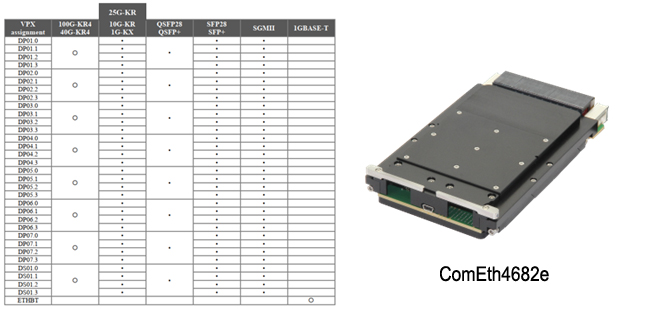
Modern VPX Ethernet switches offer remarkable flexibility. The better switches on the market allow ports to be configured as Fat Pipes (four lanes combined) or split into four Ultra-Thin Pipes—a capability called bifurcation. While the term technically means splitting into two ("bi"), it's commonly used in VPX when splitting a Fat Pipe into four Ultra-Thin Pipes.
This flexibility is powerful, but it requires one critical step: you must configure your switch ports to match your backplane profile.
Understanding Your Configuration Options
Consider a 14.4.14 profile switch. The configuration below (left image) shows six Fat Pipes (gold boxes) and seven Ultra-Thin Pipes (narrow green boxes at the bottom). Each of those six Fat Pipes can be bifurcated into four Ultra-Thin Pipes if your application requires it.
The center and right images demonstrate how the same 14.4.14 switch requires different port configurations depending on which backplane it's installed in. The switch doesn't automatically detect this—you need to configure it manually.

A Common Scenario
We frequently hear from customers working with multiple Elma chassis in their laboratory: "The switch was working fine in chassis A, but when we moved it to chassis B, it stopped working." After some discussion, we discover they're using different backplanes. Once the customer reconfigures the Ethernet switch ports to match the new backplane profile, everything works perfectly again.
Quick Checklist Before Deployment
Before installing or moving your VPX Ethernet switch:
1. Identify your backplane profile (check your chassis documentation or contact Elma
2. Determine which ports need to be Fat Pipes vs. Ultra-Thin Pipes
3. Configure the switch accordingly using your management software (such as Switchware from Interface Concept)
4. Verify connectivity after installation
Beyond the Basics
Modern VPX Ethernet switches are feature-rich, with powerful management software packages offering extensive configuration options including VLANs, QoS, routing, security, and much more. These capabilities are invaluable, but they can be intimidating if you're not a networking engineer.
While some switches work right out of the box with factory settings, that's rarely sufficient for real-world applications. Switch configuration requirements can range from minimal tweaks to substantial efforts depending on your system needs. This TIP focuses on one fundamental configuration issue that's easy to miss but critical to get right.
Learning Together
For nearly 40 years, Elma Electronic, Inc. has been providing industry with high-quality embedded computing products—from extrusions and card guides to backplanes, chassis, boards, and integrated systems. Our success stems directly from our customers: not just because they buy from us, but because they ask questions and share their experiences. We're all continuously learning better ways to solve problems.
When the same question comes up repeatedly, we know it's a topic worth sharing. That's what Elma TIPs are all about.
Questions?
Have questions about your specific backplane configuration or switch setup? Our technical team is here to help. Visit the VPX or SOSA backplane product section on our website, or use the interactive charts to select what you need. You will also find a selection of Interface’s Ethernet switches. Or, fill in the Contact Us form and we’ll put you in touch with the right person to answer your questions.
Why must a VPX Ethernet switch configuration match the backplane profile?
A VPX Ethernet switch must be configured to match the backplane’s defined signal topology, including fat pipe and ultra-thin pipe connections. If the port configuration does not align with the backplane profile, data routing may fail even when the hardware is physically compatible.
FAQs
Matching your Ethernet switch configuration to the backplane ensures that the physical interface, port mapping, and signal routing align correctly. If they don’t match, you can experience connectivity issues, misrouted traffic, or underutilized ports — which can lead to unpredictable system behavior.
It means configuring the Ethernet switch’s port assignments, MAC addressing, VLANs, and physical interfaces so that they correctly correspond to the backplane connector lanes and network topology defined by the VPX module slot profiles for your chassis
Misconfiguration can lead to non-functional ports, packet loss, network loops, incorrect fabric assignments, and difficulty communicating between modules or to external networks — all of which reduce system performance and complicate troubleshooting.
Review the backplane documentation and slot profiles for your VPX chassis to understand how Ethernet lanes are mapped. Then align the switch’s port mapping and logical configuration to those physical assignments, including desired network fabrics (e.g., 1/10/40 Gb links).
Yes — many VPX Ethernet switches can support multiple speeds (1 GbE, 10 GbE, 25 GbE, 40 GbE, and beyond). The effective speed will depend on the backplane’s physical lanes, connector capabilities, and fabric planes as defined by the system’s slot profiles and backplane design.