Match Your VPX Ethernet Switch Configuration to Your Backplane

发布日期:
January 23, 2026
Has your VPX switch card ever worked perfectly in one chassis but failed in another?


If you've experienced this frustrating scenario, you're not alone. The culprit is often a simple configuration mismatch that's easy to overlook: your Ethernet switch port configuration needs to match your backplane profile.

The Power of Bifurcation
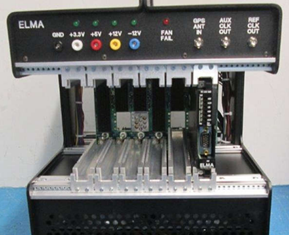
Closeup of card cage in a VPX development chassis showing the backplane and slot guides.

Modern VPX Ethernet switches offer remarkable flexibility. The better switches on the market allow ports to be configured as Fat Pipes (four lanes combined) or split into four Ultra-Thin Pipes—a capability called bifurcation. While the term technically means splitting into two ("bi"), it's commonly used in VPX when splitting a Fat Pipe into four Ultra-Thin Pipes.

This flexibility is powerful, but it requires one critical step: you must configure your switch ports to match your backplane profile.

Understanding Your Configuration Options

Consider a 14.4.14 profile switch. The configuration below (left image) shows six Fat Pipes (gold boxes) and seven Ultra-Thin Pipes (narrow green boxes at the bottom). Each of those six Fat Pipes can be bifurcated into four Ultra-Thin Pipes if your application requires it.

The center and right images demonstrate how the same 14.4.14 switch requires different port configurations depending on which backplane it's installed in. The switch doesn't automatically detect this—you need to configure it manually.

Figure 2 shows Ethernet Switch Profile 14.4.14 profile base configuration on the left; configuration for Backplane A center; and configuration for Backplane B on right.

A Common Scenario

We frequently hear from customers working with multiple Elma chassis in their laboratory: "The switch was working fine in chassis A, but when we moved it to chassis B, it stopped working." After some discussion, we discover they're using different backplanes. Once the customer reconfigures the Ethernet switch ports to match the new backplane profile, everything works perfectly again.

Quick Checklist Before Deployment


Before installing or moving your VPX Ethernet switch:


1. Identify your backplane profile (check your chassis documentation or contact Elma


2. Determine which ports need to be Fat Pipes vs. Ultra-Thin Pipes

3. Configure the switch accordingly using your management software (such as Switchware from Interface Concept)

4. Verify connectivity after installation

Beyond the Basics

Modern VPX Ethernet switches are feature-rich, with powerful management software packages offering extensive configuration options including VLANs, QoS, routing, security, and much more. These capabilities are invaluable, but they can be intimidating if you're not a networking engineer.


While some switches work right out of the box with factory settings, that's rarely sufficient for real-world applications. Switch configuration requirements can range from minimal tweaks to substantial efforts depending on your system needs. This TIP focuses on one fundamental configuration issue that's easy to miss but critical to get right.

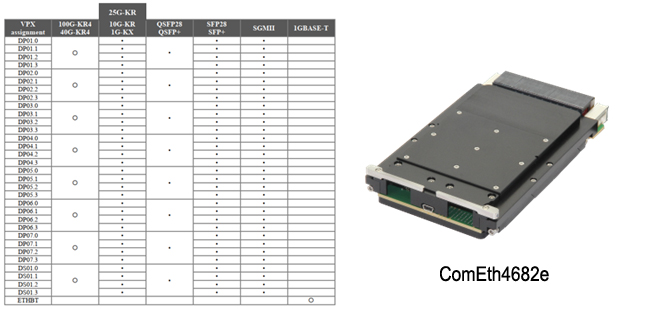
Figure 3 below shows port hardware configuration choices for an Interface Concept ComEth4682e with 14.4.15 slot profile alongside a photo of the switch.

Learning Together

For nearly 40 years, Elma Electronic, Inc. has been providing industry with high-quality embedded computing products—from extrusions and card guides to backplanes, chassis, boards, and integrated systems. Our success stems directly from our customers: not just because they buy from us, but because they ask questions and share their experiences. We're all continuously learning better ways to solve problems.

When the same question comes up repeatedly, we know it's a topic worth sharing. That's what Elma TIPs are all about.

Questions?

Have questions about your specific backplane configuration or switch setup? Our technical team is here to help. Visit the VPX or SOSA backplane product section on our website, or use the interactive charts to select what you need. You will also find a selection of Interface’s Ethernet switches. Or, fill in the Contact Us form and we’ll put you in touch with the right person to answer your questions.

FAQs

Why do I need to match my VPX Ethernet switch configuration to my backplane?

Matching your Ethernet switch configuration to the backplane ensures that the physical interface, port mapping, and signal routing align correctly. If they don’t match, you can experience connectivity issues, misrouted traffic, or underutilized ports — which can lead to unpredictable system behavior.

What does “matching configuration” actually mean in this context?

It means configuring the Ethernet switch’s port assignments, MAC addressing, VLANs, and physical interfaces so that they correctly correspond to the backplane connector lanes and network topology defined by the VPX module slot profiles for your chassis

What problems can occur if the switch and backplane aren’t matched?

Misconfiguration can lead to non-functional ports, packet loss, network loops, incorrect fabric assignments, and difficulty communicating between modules or to external networks — all of which reduce system performance and complicate troubleshooting.

How do I determine the correct switch configuration for my backplane?

Review the backplane documentation and slot profiles for your VPX chassis to understand how Ethernet lanes are mapped. Then align the switch’s port mapping and logical configuration to those physical assignments, including desired network fabrics (e.g., 1/10/40 Gb links).

Can VPX Ethernet switches support different speeds (1/10/25/40 Gbps)?

Yes — many VPX Ethernet switches can support multiple speeds (1 GbE, 10 GbE, 25 GbE, 40 GbE, and beyond). The effective speed will depend on the backplane’s physical lanes, connector capabilities, and fabric planes as defined by the system’s slot profiles and backplane design.

Downloads

No items found.

阅读更多博客文章

灵活的设计原则正在塑造定制案例选择

Learn how nimble design principles are revolutionizing custom case selection, offering diverse standard products that are modular and scalable.

为特定应用设计合适的外壳可能非常具有挑战性。随着科技公司转向更灵活的设计和开发流程,对仍能提供定制元素且具有成本效益的标准产品的需求越来越大。通过提供多样化的标准产品开始,设计师可以通过思考过程来提出想法,然后根据自己的特定愿望和需求量身定制该概念。

合作伙伴专区:CompactPCI 系列全新面貌

Explore the latest insights into CompactPCI Serial technology, highlighting its advanced serial processing capabilities for high-performance embedded systems.

CompactPCI Serial凭借其模块化、可扩展性和成本效益,在坚固耐用的嵌入式行业中取得了显著成功。它是一种模块化的开放标准,在可以承受最严苛环境要求的应用中具有很大的应用机会。毕竟,它被广泛应用于铁路和运输行业。在这篇博客中,我们向几位CompactPCI Serial社区成员问了这个问题:工程师在评估CompactPCI Serial作为潜在的系统架构时应该了解哪些方面?