Hat Ihre VPX-Switch-Karte jemals in einem Gehäuse perfekt funktioniert, in einem anderen jedoch ausgefallen?
Wenn Sie dieses frustrierende Szenario erlebt haben, sind Sie nicht allein. Der Schuldige ist oft eine einfache Konfigurationsinkongruenz, die leicht übersehen wird: Ihre Ethernet-Switch-Port-Konfiguration muss mit Ihrer übereinstimmen Rückwandplatine profil.
Die Macht der Bifurkation
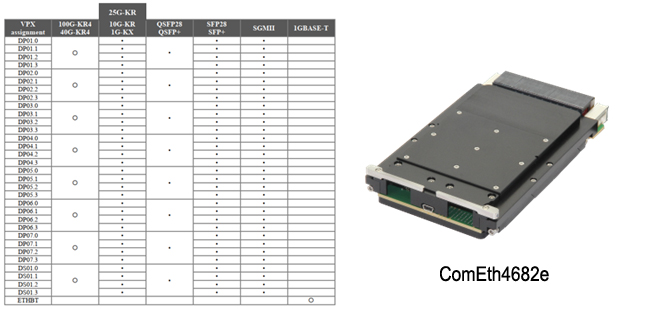
modern VPX-Ethernet-Switches bieten bemerkenswerte Flexibilität. Die besseren Switches auf dem Markt ermöglichen die Konfiguration der Anschlüsse als Fat Pipes (zusammen vier Leitungen) oder die Aufteilung in vier ultradünne Rohre — eine Funktion, die als Bifurkation bezeichnet wird. Technisch gesehen bedeutet der Begriff zwar das Aufteilen in zwei Teile („Bi“), aber in VPX wird er häufig verwendet, wenn eine Fat Pipe in vier Ultra-Thin Pipes aufgeteilt wird.
Diese Flexibilität ist beeindruckend, erfordert jedoch einen wichtigen Schritt: Sie müssen Ihre Switch-Ports so konfigurieren, dass sie Ihrem Backplane-Profil entsprechen.
Grundlegendes zu Ihren Konfigurationsoptionen
Ziehen Sie einen 14.4.14-Profilwechsel in Betracht. Die Konfiguration unten (linkes Bild) zeigt sechs Fat Pipes (goldene Kästchen) und sieben Ultra-Thin Pipes (schmale grüne Kästchen unten). Jede dieser sechs Fat Pipes kann in vier Ultra-Thin Pipes aufgeteilt werden, wenn Ihre Anwendung dies erfordert.
Die Bilder in der Mitte und rechts zeigen, dass derselbe 14.4.14-Switch unterschiedliche Portkonfigurationen benötigt, je nachdem, auf welcher Backplane er installiert ist. Der Switch erkennt dies nicht automatisch — Sie müssen ihn manuell konfigurieren.

Ein übliches Szenario
Wir hören häufig von Kunden, die in ihrem Labor mit mehreren Elma-Chassis arbeiten: „Der Switch funktionierte in Chassis A einwandfrei, aber als wir ihn auf Chassis B verschoben haben, funktionierte er nicht mehr.“ Nach einigen Diskussionen stellen wir fest, dass sie unterschiedliche Backplanes verwenden. Sobald der Kunde die Ethernet-Switch-Ports so konfiguriert hat, dass sie dem neuen Backplane-Profil entsprechen, funktioniert alles wieder einwandfrei.
Schnelle Checkliste vor der Bereitstellung
Bevor Sie Ihren VPX-Ethernet-Switch installieren oder verschieben:
1. Identifizieren Sie Ihr Backplane-Profil (lesen Sie in Ihrer Gehäuse-Dokumentation nach oder wenden Sie sich an Elma
2. Stellen Sie fest, bei welchen Anschlüssen es sich um Fat Pipes und nicht um ultradünne Rohre handeln muss
3. Konfigurieren Sie den Switch entsprechend mit Ihrer Verwaltungssoftware (z. B. Switchware von Interface Concept)
4. Überprüfen Sie die Konnektivität nach der Installation
Jenseits der Grundlagen
modern VPX-Ethernet-Switches sind reich an Funktionen und verfügen über leistungsstarke Management-Softwarepakete, die umfangreiche Konfigurationsoptionen wie VLANs, QoS, Routing, Sicherheit und vieles mehr bieten. Diese Funktionen sind von unschätzbarem Wert, können aber einschüchternd wirken, wenn Sie kein Netzwerktechniker sind.
Während einige Switches mit den Werkseinstellungen sofort funktionieren, reicht das für reale Anwendungen selten aus. Die Anforderungen an die Switch-Konfiguration können je nach Ihren Systemanforderungen von minimalen Anpassungen bis hin zu erheblichem Aufwand reichen. Dieser TIPP konzentriert sich auf ein grundlegendes Konfigurationsproblem, das leicht übersehen wird, dessen Behebung jedoch von entscheidender Bedeutung ist.
Zusammen lernen
Seit fast 40 Jahren Elma Electronic, Inc. beliefert die Industrie mit hochwertigen Embedded-Computing-Produkten — von Profilen und Kartenführungen bis hin zu Backplanes, Gehäusen, Platinen und integrierten Systemen. Unseren Erfolg verdanken wir direkt unseren Kunden: nicht nur, weil sie bei uns einkaufen, sondern auch, weil sie Fragen stellen und ihre Erfahrungen teilen. Wir alle lernen ständig, Probleme besser zu lösen.
Wenn dieselbe Frage wiederholt auftaucht, wissen wir, dass es ein Thema ist, das es wert ist, geteilt zu werden. Darum geht es bei Elma TIPs.
Fragen?
Haben Sie Fragen zu Ihrer spezifischen Backplane-Konfiguration oder Switch-Setup? Unser technisches Team hilft Ihnen gerne weiter. Besuchen Sie das VPX oder SOSA Backplane-Produktbereich auf unserer Website oder verwenden Sie die interaktiven Diagramme, um auszuwählen, was Sie benötigen. Dort finden Sie auch eine Auswahl der Ethernet-Switches von Interface. Oder füllen Sie das Kontaktformular aus und wir setzen uns mit der richtigen Person in Verbindung, um Ihre Fragen zu beantworten.
FAQs
Durch die Anpassung Ihrer Ethernet-Switch-Konfiguration an die Backplane wird sichergestellt, dass die physische Schnittstelle, die Portzuordnung und das Signalrouting korrekt ausgerichtet sind. Wenn sie nicht übereinstimmen, kann es zu Verbindungsproblemen, fehlgeleitetem Datenverkehr oder zu wenig ausgelasteten Ports kommen — was zu einem unvorhersehbaren Systemverhalten führen kann.
Es bedeutet, die Portzuweisungen, MAC-Adressierung, VLANs und physischen Schnittstellen des Ethernet-Switches so zu konfigurieren, dass sie den Backplane-Steckerspuren und der Netzwerktopologie, die durch die VPX-Modulsteckplatzprofile für Ihr Gehäuse definiert sind, korrekt entsprechen.
Eine Fehlkonfiguration kann zu funktionsunfähigen Anschlüssen, Paketverlusten, Netzwerkschleifen, falschen Fabric-Zuweisungen und Schwierigkeiten bei der Kommunikation zwischen Modulen oder mit externen Netzwerken führen — all dies beeinträchtigt die Systemleistung und erschwert die Fehlerbehebung.
Lesen Sie die Backplane-Dokumentation und die Steckplatzprofile für Ihr VPX-Gehäuse, um zu verstehen, wie Ethernet-Lanes zugeordnet werden. Passen Sie dann die Portzuweisung und die logische Konfiguration des Switches an diese physischen Zuweisungen an, einschließlich der gewünschten Netzwerkstrukturen (z. B. 1/10/40-Gb-Links).
Ja — viele VPX-Ethernet-Switches können mehrere Geschwindigkeiten unterstützen (1 GbE, 10 GbE, 25 GbE, 40 GbE und mehr). Die effektive Geschwindigkeit hängt von den physischen Lanes, den Anschlussfunktionen und den Fabric-Ebenen der Backplane ab, wie sie durch die Steckplatzprofile und das Backplane-Design des Systems definiert sind.